📞 Call 92851 49299 · Mon–Sat
/
UnitedCopier
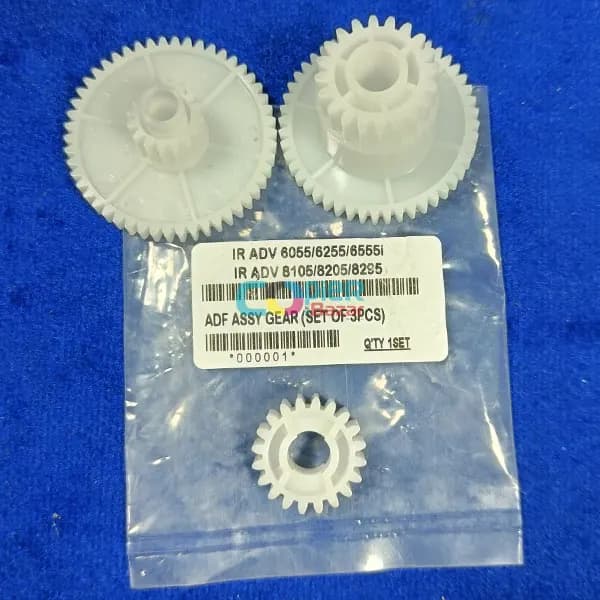
ADF Assy Gear For Canon IR ADV 6055 6255 6555i 8105 8205 8295 ( Set Of 3PCS ) ( Best Quality )

Canon

ADF Assy Gear For Canon IR ADV 6055 6255 6555i 8105 8205 8295 ( Set Of 3PCS ) ( Best Quality )

Canon IR ADV 6055 Canon IR ADV 6255 Canon IR ADV 6555i Canon IR ADV 8105 Canon IR ADV 8205 Canon IR ADV 8295

₹500₹700incl. GST

You save ₹200 (29%)

In stock

  • Demo before you buy
  • Delivery across India
  • Service and AMC available
Category
Copier Spare Parts
Brand
Canon

Description

ADF Assy Gear For Canon IR ADV 6055 6255 6555i 8105 8205 8295 ( Set Of 3PCS )

ADF Assy Gear For Canon IR ADV 6055 6255 6555i 8105 8205 8295 ( Set Of 3PCS ) copiers. The gears are made of high-quality materials and are designed to last for many years.

Features:

  • Set of 3 replacement gears for ADF
  • Made of high-quality materials
  • Compatible with Canon IR ADV 6055, 6255, 6555i, 8105, 8205, and 8295 copiers

Benefits:

  • Fixes problems with the ADF gears
  • Easy to install
  • Affordable
  • Genuine Canon part
  • Backed by the Canon warranty

Common symptoms that may indicate that you need to replace the ADF gears:

  • The ADF is not feeding documents properly.
  • The ADF is making strange noises.
  • The ADF is not working properly.

How to replace the ADF gears:

  1. Turn off the copier and unplug it from the power outlet.
  2. Open the copier cover.
  3. Locate the ADF gears.
  4. Remove the old gears and install the new ones.
  5. Close the copier cover and plug the copier back in.
  6. Turn on the copier and test it to make sure that the ADF is working properly.

If you are not comfortable replacing the ADF gears yourself, you can always take your copier to a qualified technician.

Additional information:

  • The ADF Assy Gear For Canon IR ADV 6055 6255 6555i 8105 8205 8295 ( Set Of 3PCS ) copier. They help to ensure that documents are properly fed into the copier.
  • If the ADF gears are damaged or worn, it can cause problems with the copier, such as the ADF not feeding documents properly, the ADF making strange noises, or the ADF not working properly.
  • By replacing the ADF gears, you can help to ensure that your copier is working properly and that you are able to scan documents.


tuneshare

Google it


tuneshare

Google it

Ask about this product

Send us your details and we will call back with the best price, delivery time and availability — usually within a few working hours.

We use your details only to answer this enquiry.

Related products

📞 CallWhatsApp